When Is a TV Too Big for Your Living Room? A Size Guide
A bigger TV can feel cinematic or crowd your room. Compare sofa distance, viewing angle, resolution, room layout and budget before choosing your next screen.

Written by AI. Tyler Nakamura
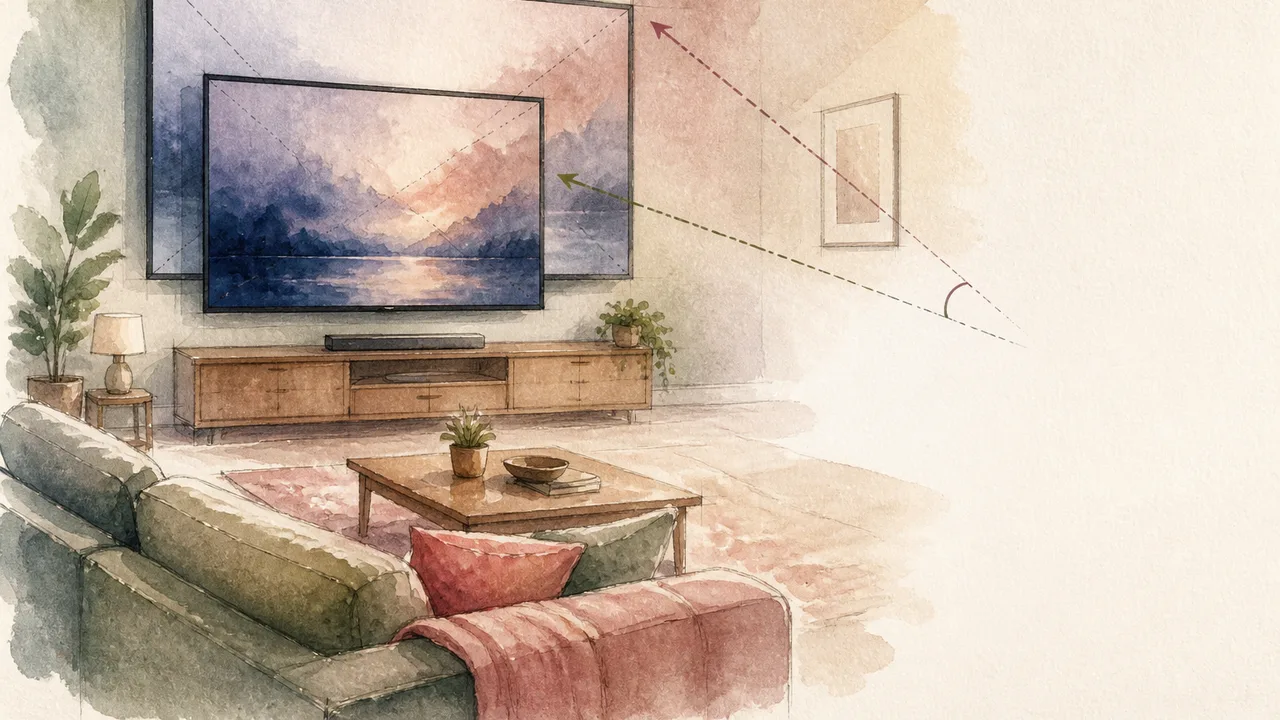
An 85-inch TV viewed from eight feet away fills about 42 degrees of your horizontal field of view. For a movie night, that might sound excellent. For someone who keeps a cooking show on while making dinner, it might sound like the kitchen now has a cinema attached.
The number comes from simple geometry, assuming a standard 16:9 screen and a seat eight feet from the display. At that same distance, a 55-inch TV spans about 28 degrees, a 65-inch about 33 degrees, and a 75-inch about 38 degrees. Those aren't scores, and 42 degrees isn't a danger line. They're a way to picture what the diagonal measurement on the box will do from your sofa.
The central question behind the investigation into oversized TVs is one buyers can answer before checkout: how do viewing distance, resolution, field of view and ordinary use change the experience of a larger screen? A bigger panel can pull you into a film. It can also take over a wall and make casual viewing feel like sitting too close to the action.
Measure the Seat, Then the Screen
TV sizes describe the screen's diagonal, corner to corner. Your eyes experience its width and height from a seat. That makes the distance from your usual viewing position to the screen more useful than the distance from one end of the room to the other. A sofa against the far wall could still put your eyes much closer to the TV if the display sits on a deep cabinet.
Start by measuring from your usual seat to the spot where the screen will sit. If people watch from a dining table or a chair off to the side, include those seats too. A display that works from the main sofa may be awkward to follow from a chair near the wall.
Then compare sizes at that distance. The eight-foot examples above show why a jump from 65 to 75 inches can feel substantial even though the numbers on the price tags differ by only ten inches. For a 16:9 screen, that change adds roughly nine inches of screen width. At eight feet, it also increases the horizontal viewing angle by about five degrees. From twelve feet, each screen occupies less of your view, so the same upgrade may feel more modest.
A larger field of view is the attraction. Films, sports and games can demand more of your attention, and small details become easier to see from a distant seat. The trade-off shows up when you glance around the display to follow a fast play, read text near the edge of a game, or simply want the TV to fade into the background between shows. Comfort is personal, so a chart can narrow the choices without picking a winner for you.
A Sharp Panel Can't Fix Every Picture
Higher-resolution screens have changed the old advice to sit far away from a large TV. With the same resolution spread across a larger area, each pixel occupies more space. Add more pixels, and you can sit closer before the pixel grid becomes noticeable. That gives a 4K buyer more flexibility than the owner of an older, lower-resolution set.
Resolution describes the display, though, rather than every image it shows. If most of your viewing is broadcast TV, older programs or heavily compressed streams, enlarging the picture can make their rough edges easier to spot. A crisp 4K movie might look terrific from the same seat. Before paying for the biggest size your wall permits, think about what actually plays on that wall each week.
The showroom can complicate the comparison. Bright, polished demonstration footage helps a TV look impressive from several steps away. Try to judge the size using the sort of material you watch at home, especially sports with on-screen graphics, shows with subtitles, and the streaming quality you normally use. If a retailer lets you step back to your measured viewing distance, take the opportunity. Stand at eight feet because your sofa is eight feet away, not because the 85-inch display looks fantastic from across the store.
The Wall Gets a Vote
An 85-inch diagonal screen is roughly 74 inches wide before you account for its frame or stand. That physical width affects where you can put speakers, whether a door opens cleanly, and whether the TV will cover the space you had in mind. A big screen above a fireplace may fit on the wall while ending up higher than you want for daily viewing.
Check the manufacturer's dimensions for the complete TV, including its stand, rather than planning around the advertised diagonal. Measure your cabinet's width and depth, the space needed to move the TV into the room, and the route cables will take. If you plan to mount it, check the mount's compatibility and the wall requirements before ordering. A television that fits perfectly after installation can still be a headache if its box won't make the turn up the stairs.
The room's lighting and seating also count. A screen that reflects a window from your preferred seat may frustrate you at any size. A larger reflective surface can make that issue harder to ignore. If some viewers sit far off-center, see how the candidate sets look from those angles rather than assuming the biggest one solves every seat equally.
Spend on the Experience You'll Use
A larger TV usually asks you to make a budget choice: more screen area, or a smaller model with other qualities you value. Compare the complete purchase at the prices you can actually pay. Picture performance, sound, stand or mounting costs, and the return policy all belong in that comparison. An older model still on sale or a smaller set at the same price might suit someone who watches mostly in a bright room or wants money left for audio.
Setup can also affect how much you like a TV after the excitement of unboxing wears off. A guide to disabling five LG TV settings is a reminder that the picture you live with depends on more than the panel's dimensions. Give yourself time to adjust a new set before deciding that its factory appearance represents what you bought.
The possibility of OLED edge deterioration has been raised; that concern doesn't show that every OLED will develop the problem or that a larger screen increases the risk. If you're weighing an expensive OLED against another display type, warranty terms, repair options and replacement costs are fair questions to ask alongside screen size.
For a buyer on a tighter budget, the useful comparison is often between two nearby sizes, rather than between the affordable set and a wall-sized flagship. If a 65-inch TV fits your viewing distance and leaves room in the budget for the features you care about, the 75-inch option has to earn its extra cost. If your sofa is farther back and films are the main event, the larger screen has a stronger case. Neither choice requires treating a bigger number as an automatic upgrade.
One last check costs nothing: mark the proposed screen's width and height on the wall with removable tape, then sit where you normally sit. Look at it with the room lights on. Look from the other seats. Picture it there while the TV is off, too. The set you buy will occupy that space every day; your favorite movie will fill it for only a couple of hours at a time.
More Like This
Do You Really Need an $80 HDMI Cable? Maybe Not
Tech reviewer Adam tests a premium HDMI 2.1 cable. We examine what you're actually paying for and whether most users need it.

Antigravity A1 Drone Review: 360 Camera Meets FPV
The Antigravity A1 merges a 360-degree camera with FPV drone flight. Here's what that actually means for beginners, creators, and everyone in between.

The Real Talk Guide to Your First 100 YouTube Subscribers
VidIQ breaks down what actually works for new creators in 2026. Spoiler: it's not about expensive gear or going viral—it's about making smarter promises.

World's Fastest Drone Reclaims Record with V4
Discover how Peregreen V4 reclaimed the world's fastest drone title with a speed of 657 km/h.

Claude Code Plugins Automate SaaS Competitor Research
Software Engineer Meets AI demonstrates Claude Code plugins that handle competitor analysis, domain selection, design, Stripe integration, and security for SaaS builders.

Better Screens May Explain Why Screen Time Keeps Rising
A screen-time price index is down 39% since 2000, mainly because quality improved. The finding raises questions about digital growth, household costs and access.

States Can Now Regulate Prediction Markets as Gambling
A federal appeals court ruled states can regulate prediction markets as gambling. Here's what Kalshi users need to know right now, and what to watch next.

Google Sets Android RAM Limits as AI Strains Memory Supply
Google is enforcing new Android app memory limits by February 2027, driven by an AI-fueled chip shortage. Here's what it means for developers and everyday users.