Minisforum MS-03 Teardown: The PCIe x4 Slot Nobody Promised
Level1Techs tested the Minisforum MS-03's expansion slot and found PCIe 4.0 x4, not the x8 some reports promised. Here's what the geometry means for buyers.

Written by AI. Mike Sullivan
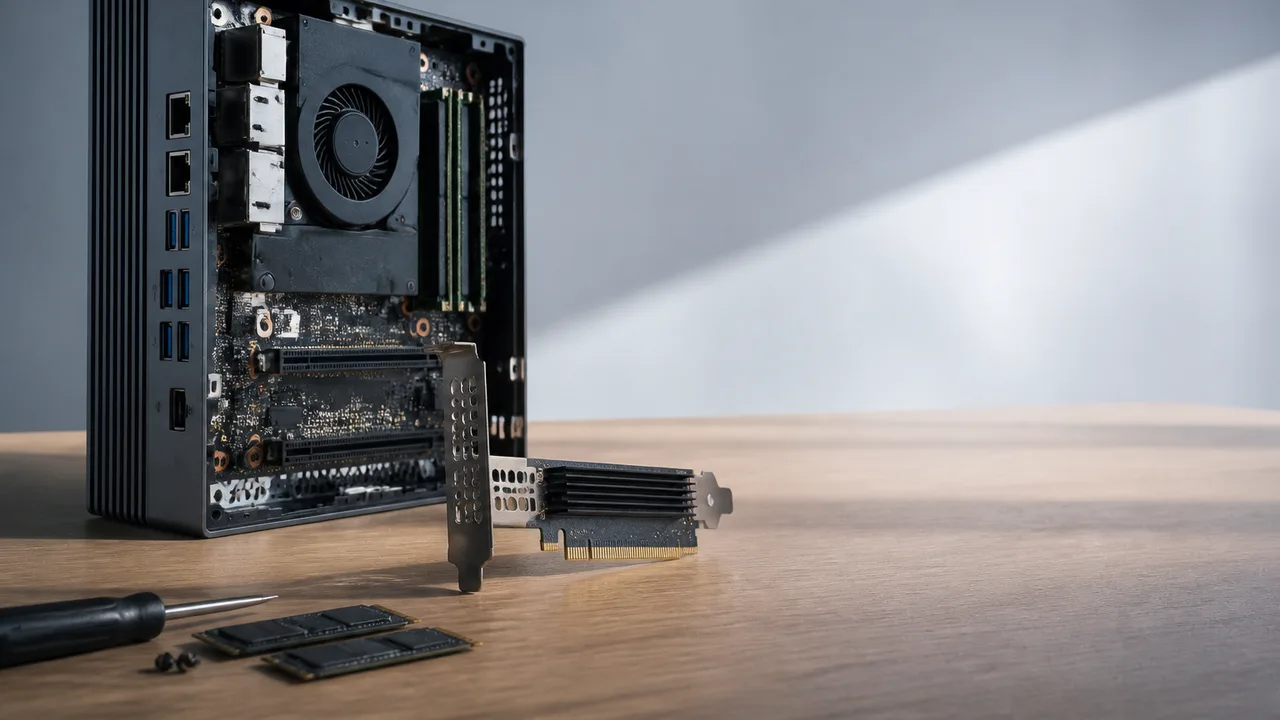
Photo: AI. Hayden Cross
When Minisforum launched the MS-03, a chunk of the coverage said the little Panther Lake box had a PCIe 4.0 x8 slot inside. Liliputing reported "an internal PCIe 4.0 x8 slot, so you may be able to bring your own discrete GPU." TechPowerUp's headline went further, promising PCIe x8 support.
Then somebody actually put the thing on a bench and counted lanes.
The Slot is Four Lanes of Gen 4
Level1Techs ran a teardown and PCIe-lane audit of the MS-03 in a video published this week, and the verdict is blunt: the half-height, half-length expansion slot (physically an x16 connector) is wired for four lanes of PCIe 4.0. Not x8. Not Gen 5. The reviewer tried toggling lane allocation in BIOS and poking at the root bridge from Linux, and the answer came back the same each time. "You can run a GPU at x4 and that works. But, it's never going to work at x8."
VirtualizationHowto's separate review reached the same conclusion, noting the physical x16 slot "is only wired in at PCIe 4.0 x4," so it does not deliver what a tower workstation's slot would. The mismatch between spec-sheet optimism and electrical reality is the single most important fact about this machine, because everything else about it is designed around that constraint.
Where the Lanes Go Instead
The 386H processor at the heart of the MS-03 carries around 20 PCIe lanes by most accounts, split between Gen 5 and Gen 4. The Level1Techs analysis suggests Minisforum spent the fast ones on storage. Two of the three M.2 slots run PCIe Gen 5 x4, confirmed by actual testing, while the third M.2 runs Gen 4. ServeTheHome's preview notes this is already an upgrade over the MS-01, which could manage Gen 4 on only one of its storage slots; on the MS-03, all three slots get at least Gen 4.
So the question for buyers is one of priorities, and it's a real question, not a trick one. Do you want two Gen 5 NVMe drives, or do you want the theoretical x8 GPU config that the marketing materials dangled? The board gives you one or the other, and the PCIe slot side of the bargain is locked at x4 Gen 4. For a NAS or an accelerator that's bandwidth-tolerant, four Gen 4 lanes (roughly 8 GB/s) is fine. For a modern graphics card, it's a bottleneck, and anyone who bought this expecting an x8 workstation slot should recalibrate before the box arrives.
Everything Else is Surprisingly Grown-Up
Here's the funny part: strip away the slot confusion and the MS-03 is one of the better-specified mini PCs of the year. The networking alone reads like a home labber's wish list, 10GbE copper, 2.5GbE copper, and dual 10GbE SFP+, plus Thunderbolt 4, HDMI, and Wi-Fi 7 via Intel's BE211 chipset, which the video calls "one of the best" rather than the cheap radio vendors usually stuff in.
The 240 W power brick isn't headroom for extreme CPU overclocking; it's accounting for the 75 W a slot peripheral can draw, USB peripherals, and the SFP+ chipsets, which historically idle terribly. Minisforum has been iterating on idle power across the MS-01, MS-02, and now MS-03, and the reviewer measured around 50 W at boot. Server-grade networking silicon in a desktop chassis has always fought the electricity bill; it's encouraging to see a vendor actually engineering for that fight.
Memory is the other big trade. The 386H variant in the MS-03 uses socketed DDR5 SODIMMs rather than soldered LPDDR5, which means you can populate it with up to 128 GB, the reviewer tested exactly that. The cost is bandwidth: about 42 GB/s measured on the MS-03 versus roughly 105 GB/s on an LPDDR5-equipped ASUS NUC Pro. The reviewer pushed back on anyone calling the 42 GB/s figure "half of the theoretical bandwidth," explaining the test methodology involves different cache-miss behavior, but the gap against soldered memory is real either way. You can see it in integrated-graphics benchmarks, where Shadow of the Tomb Raider at low settings managed 71 FPS at 720p. If you want to play games on this thing, buy the discrete GPU. Then remember the discrete GPU gets four Gen 4 lanes.
Heterogeneous Cores Need a Modern Kernel
Panther Lake's 16 cores break down as four P-cores, eight E-cores, and four low-power E-cores. The video's advice for anyone running Proxmox or mixed workloads: keep the kernel current. Recent Linux patches for P-core and LPE-core scheduling improved matters considerably, and the reviewer found the stock scheduler aggressively pinning high-performance threads to the four P-cores during benchmarking, which is exactly the wrong behavior if you're trying to fan work across all sixteen cores. Single-core Cinebench scores around 2061 put this in desktop-class territory for a mobile-derived chip, and Geekbench 6 results matched a comparison Panther Lake machine closely.
It's the same lesson every heterogeneous CPU generation teaches: the silicon ships before the software is fully ready for it. Intel's 12th and 13th gen parts went through the same phase, and the low-power E-cores here don't match those older E-cores anyway, as the video notes. Buy this platform expecting to update your kernel, not just your BIOS.
Who Actually Buys This
The same crowd that made the MS-01 and MS-02 fixtures of the home lab scene, and the MS-02's formula of more cores and more PCIe is still the play if raw expansion is the goal; ServeTheHome tested whether that machine's three PCIe slots actually deliver. The MS-03 instead splits the difference: Panther Lake's fast P-cores for workstation duties, absurd networking, five generations of Minisforum iteration on power management, and a storage subsystem that finally gives every slot at least Gen 4. The reviewer's own summary: "If I had a choice between the MS-01 and the MS-03, I think I would pick the MS-03."
One more practical note from testing: the included M.2-to-U.2 adapter is unreliable with Gen 5 U.2 drives, working with some and not others. Use Gen 4 for U.2 and save yourself the weekend of AER errors. The PCIe error handling itself earned praise, including with an Intel X710 NIC, so when things do link up, they link up clean.
The uncomfortable lesson here isn't about Minisforum specifically. Early spec sheets, pre-production units, and secondhand reporting all said x8. The truth required a screwdriver and a Linux PCI inventory. Until vendors publish full lane-mapping diagrams alongside their marketing, the only reliable PCIe geometry document is the one you make yourself, after the machine is on your bench. Budget accordingly, and maybe wait for the forum thread before you order the GPU cooler.
More Like This
When Your Server Dies and Supply Chains Don't Care
Small business sysadmins face a brutal reality: servers die on their own schedule, not the supply chain's. Here's what DIY looks like in 2025.
Framework Desktop Gets Two R9700 GPUs via PCIe Bridge
Level1Techs strapped two ASUS R9700 GPUs to a Framework Desktop using a Broadcom PLX bridge, hitting 192GB total memory for local AI workloads. Here's what worked.
The Console Killer Problem Nobody's Talking About
Mini PCs could replace gaming consoles, but GPU form factors are the real bottleneck. Why the industry needs new standards before the next component shortage.
Bosgame M5 Review: 128GB Local AI Mini PC Tested
The Bosgame M5 packs AMD's Strix Halo chip and 128GB of RAM into a mini PC that costs significantly less than AMD's own version. Here's what you actually get.
Minisforum MS-03 Review: A Worthy MS-01 Successor?
The Minisforum MS-03 brings triple 10GbE, PCIe 5.0 NVMe, and a power-efficient Intel Core Ultra 9 to the home lab. Here's what the trade-offs actually look like.
Front-to-Back Motherboards Are Solving Real Problems
The BTF standard relocates power connectors to improve airflow and cable management. Level1Techs demonstrates the practical benefits beyond aesthetics.
3D DRAM: The Memory Scaling Challenge Explained
DRAM scaling is hitting a wall around 2029. Here's what true 3D DRAM actually involves—and why it's harder than 3D NAND made it look.

AI Coding's Modular Mirage: Real Pattern or Hype?
A pattern called 'Modular Mirage' is circulating in AI coding circles. The research behind it reveals something more unsettling than any name suggests.