Bosgame M5 Review: 128GB Local AI Mini PC Tested
The Bosgame M5 packs AMD's Strix Halo chip and 128GB of RAM into a mini PC that costs significantly less than AMD's own version. Here's what you actually get.

Written by AI. Bob Reynolds
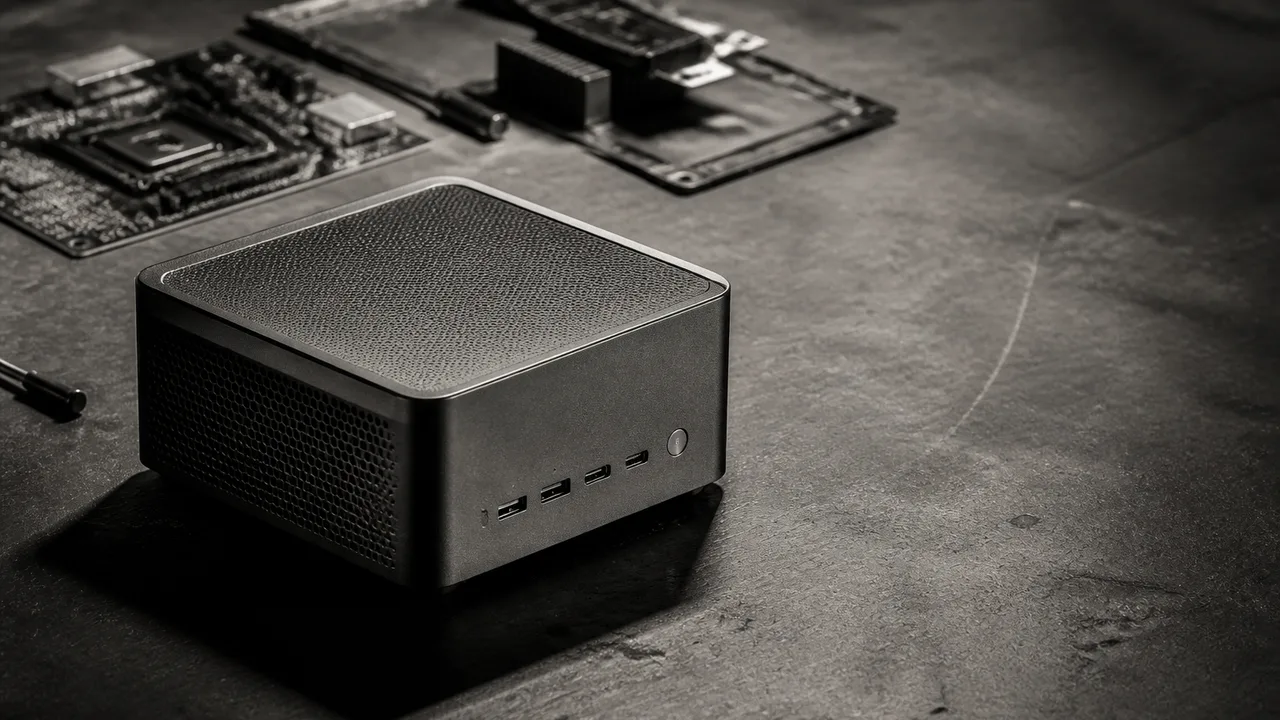
Photo: AI. Atticus Ferenczi
The mini PC market has a problem that nobody talks about enough: most of these boxes look identical from the inside. Same reference motherboard, same chip, different chassis and badge, different price. Understanding that dynamic is the first step to understanding why the Bosgame M5 is worth examining — and why the $1,000 price gap ServeTheHome's Patrick Kennedy flagged against AMD's own Ryzen AI Halo box deserves more than a shrug.
The M5 runs AMD's Ryzen AI Max+ 395, the chip AMD calls Strix Halo internally. Sixteen Zen 5 cores, RDNA 3.5 graphics, and 128GB of soldered LPDDR5X memory — all on a single package. That last part is the whole story, really. The reason memory-bandwidth-hungry workloads like local AI inference run tolerably on these systems is that the CPU, GPU, and memory all sit on the same die, sharing a unified pool. No PCIe bottleneck shuttling data to a discrete card. The tradeoff is that you cannot upgrade the memory after purchase. What you buy is what you have.
Kennedy's review surfaces something that will register immediately to anyone who follows this space: the M5 is built on the same 6United AXB35 motherboard that underpins other Strix Halo mini PCs on the market, including the GMKtec Evo X2 that ServeTheHome reviewed roughly a year ago. The port configuration is essentially identical between the two. This is standard practice in the mini PC industry — white-label motherboards with multiple ODMs wrapping their own chassis around them — but it matters when you're trying to evaluate what you're actually paying for. In this case, the answer is largely the chassis, the thermals, and the price negotiated with the channel.
What the hardware actually offers
The front panel gives you a physical performance mode switch — a hardware dial that cycles between three power envelopes — alongside USB 3.2 ports, a USB 4 Type-C port, and an SDXC card slot. That last item is more useful than it sounds; machines pitched at video editors and local AI users tend to attract people who move media around, and not having to carry a dongle matters at the margins.
Around back: dual HDMI 2.1 and DisplayPort outputs, another USB 4 port, additional USB-A, and the wired LAN port. That LAN port is where the M5 stumbles. It tops out at 2.5 gigabit Ethernet. Kennedy doesn't soften this: "This definitely needs to have 10 gigabit Ethernet instead of two and a half gig. I don't know why the heck it doesn't have 10 gig but it should."
He's right, and the gap is not trivial. The Minisforum N5 Max, which packs the same AMD Ryzen AI Max+ 395 chip, ships with dual 10GbE. If your intended use involves pulling large model weights over the network, or distributing inference traffic, 2.5GbE creates a real bottleneck. Kennedy floats the idea of stuffing a 10GbE M.2 NIC into the spare M.2 slot and routing a cable out through the chassis — "it would be a little bit janky," he admits, which is a diplomatic description — but the point stands that buyers who need fast networking will need to look elsewhere or improvise.
One small design detail that Kennedy calls out as genuinely useful: the M5 ships with a vertical stand. It sounds trivial until you consider that these machines vent through the top and sides, and orienting them vertically meaningfully improves airflow. Many competing units don't include stands. The M5 does, with rubber inserts to hold the chassis securely. Small thing. Not nothing.
Performance modes and what they mean in practice
The three-position performance switch on the front panel controls the system's power envelope, and the effect on multi-core workloads is significant. Single-core performance stays relatively flat across modes because the chip hits its boost clock regardless — you get similar results per-core whether you're running quiet or running hot. Push into multi-core territory, or drive the integrated GPU hard, and the gap between low and high power modes becomes measurable.
Kennedy's numbers on power draw: low power mode sits around 55 watts at sustained load with higher boost headroom available; normal mode runs higher. Full-tilt operation pushes fans into the mid-40 dBA range — audible, but not disruptive for a machine running inference in the background. Normal operation lands in the mid-to-high 30s. For a workstation doing AI tasks, that's reasonable. The 240-watt external power brick is enormous relative to the chassis, which is the honest cost of squeezing this much compute into a package this small.
The practical upside of the physical switch: you can throttle the machine mid-task without touching software. Kennedy notes that if you're on a call and the fans spin up, one button press dials it back. That's a simpler affordance than the software-based power profiles that most competing units require, and it's the same approach that the Acemagic M1A Pro+ takes with its physical dial. When you're running a machine as a local AI appliance, not as an occasional-use desktop, the ability to manage noise without navigating a settings menu has real daily value.
The local AI use case, examined honestly
The genuine case for a unified-memory system like this comes down to model size versus speed. A discrete GPU with dedicated VRAM will generate tokens faster. But discrete GPUs with large VRAM are expensive, and the largest consumer GPUs still cap out well below 128GB. The M5's 128GB pool changes the calculation for anyone trying to run models that simply won't fit on a conventional GPU card.
Kennedy describes a workflow where Windows users can allocate the majority of that pool — up to 96GB in his example — to the GPU side via AMD's Adrenalin driver, leaving a smaller portion for the OS and applications. Linux users can push that allocation even further, squeezing more of the 128GB toward inference. He's run Qwen 3 models regularly on Strix Halo hardware, noting that "smaller models are getting very capable" — a fair characterization of where model efficiency has landed over the past year.
What Kennedy doesn't oversell is the speed. This is not a machine that competes with a server GPU for raw throughput. Inference is memory-bandwidth-bound on unified-memory systems, and 128GB of LPDDR5X, however wide, is not the same as GDDR7. For interactive use — chatting with a local model, running document analysis, automating configuration tasks — the speed is sufficient. For batch processing at volume, a dedicated GPU wins.
The ServeTheHome team uses an older Strix Halo machine for exactly the kind of unglamorous infrastructure work that rarely makes demo videos: running local models to configure firewalls and network switches, keeping credentials off cloud services entirely. "Being able to run all of that locally so that way we're not like sending any credentials or anything like that and we know we're not sending them out to cloud services is always very nice to have," Kennedy notes. That's not a benchmark. It's a use case description, and it's a credible one.
AMD's software trajectory matters here
A year ago, running local AI workloads on AMD hardware was noticeably harder than on Nvidia. The model ecosystem was thinner, driver support was patchier, and community tooling assumed CUDA. Kennedy is direct about how much that has changed: "AMD over the last year has really put a lot of effort into that."
The improvement is real and worth acknowledging. It's also incomplete. Nvidia's software stack still has a deeper moat, particularly for users who need to go beyond standard inference workflows. AMD's advantage on the Windows side — supporting both Windows and Linux natively, where Nvidia's GB10 has historically skewed toward Linux — is meaningful for the mainstream buyer who wants a single machine that handles AI tasks and conventional computing without dual-booting.
The central question
The M5's value proposition is straightforward: it offers a meaningful entry point into 128GB unified-memory computing at a price significantly below AMD's own Ryzen AI Halo developer system. The chassis is arguably better designed than at least one of its ODM siblings — easier M.2 access, a cleaner stand solution, a physical performance switch. The 2.5GbE ceiling is a real constraint for network-intensive workloads, and the soldered memory means you are committing to 128GB as your ceiling, not your floor.
Whether that trade makes sense depends entirely on what you're doing with it. If the bottleneck in your workflow is model size rather than inference speed, and you don't need fast wired networking, the M5 makes the math work. If you need throughput above all else, or if fast networking is load-bearing, it doesn't — and no amount of price advantage changes that.
The harder question is whether this category as a whole is maturing into reliable infrastructure or still operating as enthusiast territory with infrastructure-grade ambitions. Kennedy's team running a Strix Halo box as a permanent network automation appliance suggests the former. The workarounds still required to extract maximum performance suggest the latter. Both things are true right now, which is usually where interesting technology lives.
More Like This
Anthropic's Claude Routines Targets No-Code Automation Market
Claude Routines lets users automate workflows with natural language instead of drag-and-drop builders. Is this the end of traditional no-code platforms?

AgentZero's Sub-Agents: Self-Modifying AI Delegation
AgentZero demonstrates AI agents that create and manage specialized subordinates on demand. The system modifies itself—which raises practical questions.
AMD Instinct MI350P: 144GB HBM3E in a PCIe GPU
AMD's Instinct MI350P brings 144GB of HBM3E and 3.6TB/s bandwidth to standard PCIe servers. Here's what it means for the mid-market AI infrastructure gap.

Dual DGX Spark Matches Pricier AI Clusters in Testing
Level1Techs tests a dual DGX Spark against a far more expensive RTX Pro 6000 cluster—and the results challenge assumptions about what local AI actually costs.
Not Every Problem Needs AI. Here's How to Tell.
Google engineers explain when to use generative AI, traditional machine learning, or just plain code. The answer matters more than you'd think.

Gigabyte MW94-RP0 Xeon 6 E-ATX Workstation Board Review
Wendell at Level1Techs tears down the Gigabyte MW94-RP0 Xeon 6 E-ATX board: six PCIe Gen 5 slots, DDR5-6400, and some real airflow warnings.

Using Claude Fable and GPT Sol Together for AI Coding
Chase AI's four-stage workflow pairs Claude Fable's planning with GPT Sol's execution. Here's what the approach actually involves—and where the questions remain.

Claude Agent OS: Building AI Systems That Outlast the Models
Julian Goldie's Claude Agent OS connects multiple AI agents through shared memory and model-agnostic orchestration. Here's what the architecture actually does—and why it matters.