Claude Skills Are Quietly Wrecking Your Workflow
More Claude Code skills isn't better—it's slower, messier, and riskier. Here's what actually goes wrong and how to fix it.

Written by AI. Yuki Okonkwo

Photo: AI. Lila Bencher
There's a specific kind of false confidence that comes from having a lot of tools. You see it with browser tabs, with Notion pages, with Slack channels—and now, apparently, with Claude Code skills. The more you accumulate, the more covered you feel. The more covered you feel, the less you actually look at any of it.
Mark Kashef, who runs a Claude Code-focused community called Early AI Adopters, made a video about this recently that I think is worth unpacking—not because everything in it is gospel, but because the core problem he's diagnosing is real and underappreciated.
The Pokémon card problem
His opening line sets the tone: "People stack skills like they're Pokémon cards. They grab public ones off of random repositories, and the truth is most of them aren't even useful. And the ones that are carry the risk of having malicious code."
That's two separate problems bundled into one sentence, and I want to hold them apart for a second.
The efficiency problem is the one Kashef spends most of the video on. Every skill you load into Claude Code activates at the start of every session—somewhere between 69 and 150 tokens each, he says. That sounds tiny, but tokens compound. The more you stack on top of an already-loaded Claude MD file, project rules, and conversation history, the more you're cramming into a context window that the model has to make sense of all at once. The downstream effect: Claude starts firing the wrong skill for the wrong task, or not firing one at all, and you're left wondering why your supposedly powerful AI setup keeps fumbling obvious requests.
The security problem is real but gets less airtime in the video. Public skill repositories are, by nature, code written by strangers. Kashef flags malicious code as a risk without going deep on it, which is probably the right call for a workflow-optimization video—but it's worth naming clearly: grabbing skills from random GitHub repos is roughly equivalent to running shell scripts you found on a forum. Most are fine. Some aren't. And the ones that aren't can do real damage.
The truncation cliff nobody talks about
Here's the specific technical detail that I found most interesting—and that I'd genuinely never thought about before watching this.
When you write the description for a Claude Code skill in its YAML front matter, you probably assume Claude reads the whole thing. It doesn't. After a certain character limit, the description gets cut off. If you've written a careful, thorough explanation of when and how to use your skill, there's a decent chance Claude only sees the first paragraph of it.
This matters a lot. Kashef's point is that descriptions need to be trigger-heavy up front—front-loaded with the specific conditions that should invoke the skill, not buried in paragraph three of your carefully written documentation. The name of the skill also needs to do heavy lifting, because it's one of the few things Claude will reliably see in full. "Daily planner," "daily standup," "morning routine," and "today's tasks" are not sufficiently different names. If you have all four, you've essentially created a coin-flip situation every time you open a session.
This is a constraint most Claude Code users probably don't know exists, and it reframes the entire practice of skill-writing. You're not writing for a human who will read your skill carefully. You're writing for a model that's scanning for triggers under tight token pressure.
A skill is a suggestion, not a guarantee
One of the most clarifying things Kashef says is this: "A skill is a suggestion to the AI, but a hook or a Python function is a deterministic rule."
That's a useful frame. A lot of the frustration people have with Claude Code skills—the wrong thing firing, or nothing firing, or inconsistent behavior across sessions—stems from treating probabilistic tools like deterministic ones. Skills are more like personality traits than like commands. You can cultivate them, but you can't guarantee them.
His prescription: if the process you're trying to automate is highly predictable, runs the same way every time, and doesn't need conversational flexibility—think API calls, file transformations, standardized report generation—a CLI command or Python function is probably the right primitive. Skills are best suited for tasks that genuinely benefit from the model's judgment, where the inputs vary and the optimal output requires some interpretation.
This "wrong primitive" question is something Kashef returns to throughout the video, and it's the single most useful heuristic in the whole piece. Before you write a new skill, it's worth asking: does this actually need to be a skill?
Sculpting, not stacking
The improvement methodology Kashef demonstrates is called reverse meta prompting, and the idea is straightforward even if the name is a bit jargony. After you use a skill and the session ends—even if it went badly, especially if it went badly—you ask Claude to critique the skill against what just happened, identify the gaps, and propose concrete edits.
"If you improve this skill by 1% every single day for 30 days, by the end of the month, you'll have an ironclad skill," he says.
The compounding logic here is sound. Most people treat skill creation as a one-time event: write it, use it, forget it. The feedback loop Kashef describes—where the skill literally interviews you for the information it needs to do its job (via a tool called askuserinput), and then asks you to rate the session afterward—is a different mental model entirely. It treats a skill as a living artifact that degrades if you don't maintain it and improves if you do.
He also demonstrates using Claude Code's subagent capability to test a skill before you ever use it yourself—spinning up two parallel agents, one to role-play as diverse users and surface UX friction, another to audit for structural redundancies. Whether this workflow is accessible to casual Claude Code users or requires a more sophisticated setup isn't entirely clear from the video, but the underlying principle—automated red-teaming of your own tools—is genuinely interesting.
What the video doesn't address
A few things worth sitting with, since Kashef's video is explicitly practitioner-focused and doesn't zoom out much:
The "lean stack" ideal he advocates for is probably right for individual power users who are actively curating their setup. But teams present a different problem. If multiple people share a skill library, who owns the pruning? Who decides what gets consolidated? The governance question around shared AI tooling is still pretty underdeveloped, and individual best practices don't automatically scale to collaborative environments.
There's also an implicit assumption throughout that users have enough familiarity with Claude Code's internals—YAML front matter, context window mechanics, the difference between skills and Claude MD files—to act on this advice. That's a reasonable assumption for Kashef's audience, but it means the video is drawing a map that only some people will be able to read.
And the security point he raises at the top gets dropped almost immediately. The risk of grabbing untrusted skills from public repositories deserves more than a passing mention. Malicious code embedded in a tool that Claude Code invokes with some regularity could sit unnoticed for a long time in a large, unaudited skill stack—which is exactly the scenario Kashef's video inadvertently describes as common.
The actual question
The core argument here is that more is actively harming Claude Code users, and that the path to better AI performance is curation, not accumulation. That's a genuinely counterintuitive claim in a space that's constantly selling new capabilities, new plugins, new skills to add.
The evidence Kashef presents is mostly anecdotal and drawn from his own client work—he's not citing controlled experiments. But the mechanics he describes (context bloat, description truncation, skill overlap) are real properties of how Claude Code works, not speculation.
The more interesting question might be why this pattern keeps emerging. Why do people stack skills they never use? Probably the same reason they hoard browser tabs and unused subscriptions—acquisition feels like progress, and pruning feels like loss, even when the math clearly runs the other way.
The Pokémon card analogy from the top of Kashef's video lands differently once you've sat with all of this: you don't win Pokémon by having the most cards. You win by knowing which ones to actually play.
More Like This
Claude Just Got Skills for Excel and PowerPoint
Anthropic released three major updates to Claude's Office integrations, including custom Skills that let you automate workflows in Excel and PowerPoint.
35 Claude Skills on GitHub Turn AI Coding Assistants Into Experts
Developers are building specialized skills that transform Claude and other AI coding assistants into domain experts. Here's what's actually worth using.

Ralph Wigum Plugin: Persistence for Claude Code
Explore Ralph Wigum, a plugin for Claude Code that ensures AI task persistence and self-correction.
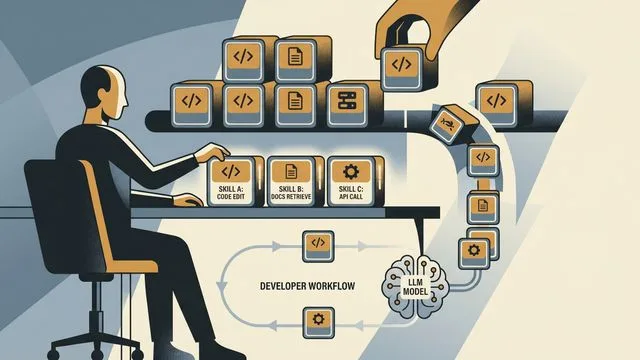
AI Skills at Scale: Teaching Agents Your Standards
Nick Nisi and Zack Proser of WorkOS make the case that structured markdown 'skills' are how you stop re-explaining yourself to AI agents every single day.

Claude's 1M Context Window: The Upgrade That Could Cost You
Anthropic's free 1M context window for Claude sounds amazing—until you understand how token management actually works under the hood.

OpenAI's Symphony: The Free Tool That Builds Itself
OpenAI open-sourced Symphony, a coding agent orchestrator with a wild self-building install process. Here's what it does, what it costs you, and what OpenAI gets back.

How Optimization Powers Modern AI and Engineering
From training ChatGPT to imaging black holes, optimization is the hidden engine behind modern AI and engineering. Steve Brunton's lecture explains how.

David Patterson on CPUs, GPUs, TPUs, and 50 Years in Computing
Turing Award winner David Patterson breaks down RISC vs. CISC, the GPU-to-TPU shift, Moore's Law's real status, and what 50 years in computing actually taught him.