Loop Engineering: Moving Beyond One-Shot AI Prompting
From cron-job automations to multi-day autonomous goals, loop engineering is changing how developers interact with AI. Here's what that actually means.

Written by AI. Marcus Chen-Ramirez

Photo: AI. Ines Cienfuegos
There's a specific kind of developer fatigue that's been building quietly: the exhaustion of babysitting an LLM. You prompt it, review it, prompt again, course-correct, prompt again. Smart people doing repetitive oversight work while the model—theoretically capable of so much more—waits for its next instruction like a golden retriever expecting a treat.
The reaction to that fatigue is what's now being called "loop engineering," and it's worth understanding what's actually being proposed here before the hype machine swallows it whole.
What a Loop Actually Is
The Developers Digest video that kicked off this particular conversation frames loop engineering as a spectrum, which is the honest way to do it. At one end: a simple recurring automation that checks your inbox every morning and routes messages to a project board. At the other: something like Andrej Karpathy's AutoResearch, which runs experiments at set intervals, evaluates what's working, and advances the promising threads autonomously—a closed-loop research assistant that doesn't need you hovering.
Between those poles are two practical primitives getting real traction in tools like Claude Code and Codex: goals and /loop.
A goal is essentially "run until done." You describe an objective, and the system works autonomously until it hits completion—or, ideally, until it can verify completion through something concrete like passing unit tests. The presenter describes running goals for days at a stretch on complex parsing tasks: "I've had goals that have run for multiple days for particular things that I've wanted to set up." That's not a chatbot. That's closer to delegating a project.
The /loop command is different in character: interval-based rather than completion-based. You specify a cadence ("every 5 minutes for the next 3 hours") and a directive, and the system sets up a cron job that fires within the LLM session. The framing is deliberately exploratory: "Think about it handing it off to a really ambitious junior engineer. It might go off in a direction that doesn't necessarily make sense, but often times it might not even make sense to you that it isn't a good approach to try until you actually see the results back."
That framing is worth sitting with. It's an honest description of the tradeoff: you gain breadth and parallelism, you give up predictability. Whether that's a good trade depends entirely on what you're building.
One thing worth knowing about /loop specifically: it lives and dies with your session. Session-bound scheduling is a real limitation—close the window, lose the loop. Goals tend to be more durable in practice, which is why the presenter says he reaches for goals more often.
The Automations Tab Nobody Used
The more immediately practical piece of this video isn't the headline features—it's the automations tab that apparently shipped in Codex, Claude Code, and Cursor without generating much fanfare. The presenter admits he ignored it at first: "These sort of came and went as a little bit of an announcement. And then I actually didn't see a lot of people focus on these, myself included."
What changed his mind was experiencing the compounding effect of a single useful daily automation. Once you have one thing running reliably—say, an inbox triage that surfaces your highest-priority items each morning—you start looking for the next repeatable task that could run the same way. Security vulnerability scans on a cadence. Auto-generated project documentation. Weekly skill summaries pulled from your work history.
This is the mundane version of autonomous AI loops—less Karpathy running overnight experiments, more getting your administrative overhead to stop eating your mornings. Less transformative on paper, more likely to actually change how someone's workday feels.
The Memory Angle Is Genuinely Interesting
The most conceptually rich part of this discussion is the framing around continual learning, which the video approaches via the idea of LLM "dreaming."
The mechanism: have an agent periodically review everything that happened over the past day, synthesize it into a compact representation, and store it in a way the model can retrieve efficiently later. The analogy to human memory consolidation during sleep is imperfect but evocative—the point isn't biological accuracy, it's that models currently suffer from context-window amnesia. Each session starts fresh. Automations that build persistent, structured memory are one approach to fixing that without waiting for the underlying models to change.
"Once you have a system that can learn and doesn't just need to be stuck with the pre-training of the model and the harness—and it can actually take and explore different tasks within the world and ultimately build on those different things over time—that is a system that can progressively get smarter over time."
That's a real aspiration. It's also worth noting that "continual learning" is a phrase that means different things to different people in ML research, and the version being described here—automated memory synthesis via periodic agents—is a lightweight pragmatic approximation, not an architectural breakthrough. It's still meaningful as a workflow pattern; just don't confuse it for something happening inside the model.
The Human-in-the-Loop Question
One of the more grounded moments in the video is the explicit caveat about automation scope. The presenter makes a point of saying he uses automations to draft emails, not send them: "Oftentimes it doesn't actually get all of the context right in terms of what I should do. I just use it as a helpful assistant."
This is the part that tends to get lost in enthusiastic coverage of agentic AI. Loop engineering doesn't have to mean end-to-end autonomy. You can architect automations that stop before consequential actions and surface a decision to a human. The question of where exactly to draw that line—and how to draw it systematically rather than just hoping you remembered to configure it correctly—is genuinely unresolved, and it's where the interesting implementation challenges in agentic systems tend to live.
There's also a context-rot problem that loop-based systems amplify rather than solve. Long-running tasks accumulate conversation history; models operating inside extended contexts can start to drift, reinforce errors, or lose track of early constraints. Verification mechanisms—unit tests, output validation, human checkpoints—aren't just nice to have in these architectures. They're the load-bearing wall. The presenter's emphasis on choosing "bounded" tasks with verifiable completion criteria isn't just good advice; it's a precondition for the whole thing working reliably.
What This Shift Is Actually About
Framing this as "stop prompting, start building loops" is rhetorically punchy but a bit misleading. You don't stop prompting; you front-load the prompting into system design rather than spreading it across every interaction. The skill being described is less about any individual command and more about thinking in systems: what are the recurring tasks in my workflow, what does completion look like, what would failure look like, and how do I verify the difference?
That's not a new skill. It's what software engineers have been doing with cron jobs, pipelines, and CI/CD systems for decades. What's new is that natural language has become a viable interface for building those systems, which dramatically lowers the threshold for who can construct them. A YouTube creator routing their inbox to a project board via Claude Code isn't writing bash scripts—they're describing what they want in plain English and getting something functional back.
Whether that accessibility translates into better outcomes, or just faster paths to broken automations running unattended, probably depends on how seriously people take the verification and oversight pieces that tend to get less airtime than the cool demos.
The creator of Claude Code apparently no longer prompts the model much at all. That's a striking claim. The more interesting question is what they built instead—and whether the loops are actually checking their own work.
More Like This
At GTC 2026, the Real AI Story Was About People, Not Hype
GTC 2026 revealed working AI applications in robotics, biotech, and automation—not slop. The real tension? Management still doesn't understand the tech.

Claude Code Agentic OS: Skills Beat Dashboards
The flashy Claude Code dashboards get the clicks, but the real value lives in a skill and automation backbone most users never build. Here's what that actually means.

Why Your AI Agents Aren't Working (Yet)
You set up AI agents and nothing useful happened. Mark Kashef argues the problem isn't the agents—it's the data underneath them. Here's what that means.
Claude Code Channels: Always-On AI Agents for DevOps
Anthropic's Channels feature turns Claude Code into an always-on agent that reacts to CI failures, production errors, and monitoring alerts automatically.

AI Writes Your Code, But Who Sets the Rules?
A Laravel developer built the same app twice—once with a bare prompt, once with guardrails. The gap in code quality raises real questions about AI-assisted development.

NVIDIA Nemotron 3.5 Lightning Targets AI Agent Work
NVIDIA's Nemotron 3.5 Lightning is a 30B MoE model built to handle the repetitive, high-volume work inside AI agents—faster and cheaper than frontier reasoning models.
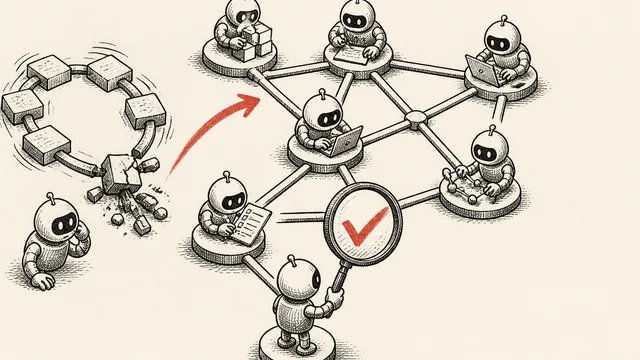
Graph Engineering: Verification Is the Hard Part
Graph engineering runs AI tasks in parallel across multiple agents—but one bad node can poison everything. Here's how verification actually works.

Jack Dorsey's Buzz Puts AI Agents in a Chat Room
Julian Goldie tests Block's new Buzz platform live, showing how AI agents can collaborate on SEO, image creation, and quality control in a Slack-style workspace.