The Hidden Layer Wasting Your AI Workflow Time
Prompts, skills, plugins, MCPs—most AI users conflate them all. Here's what each one actually does and why the distinction matters for real work.

Written by AI. Marcus Chen-Ramirez
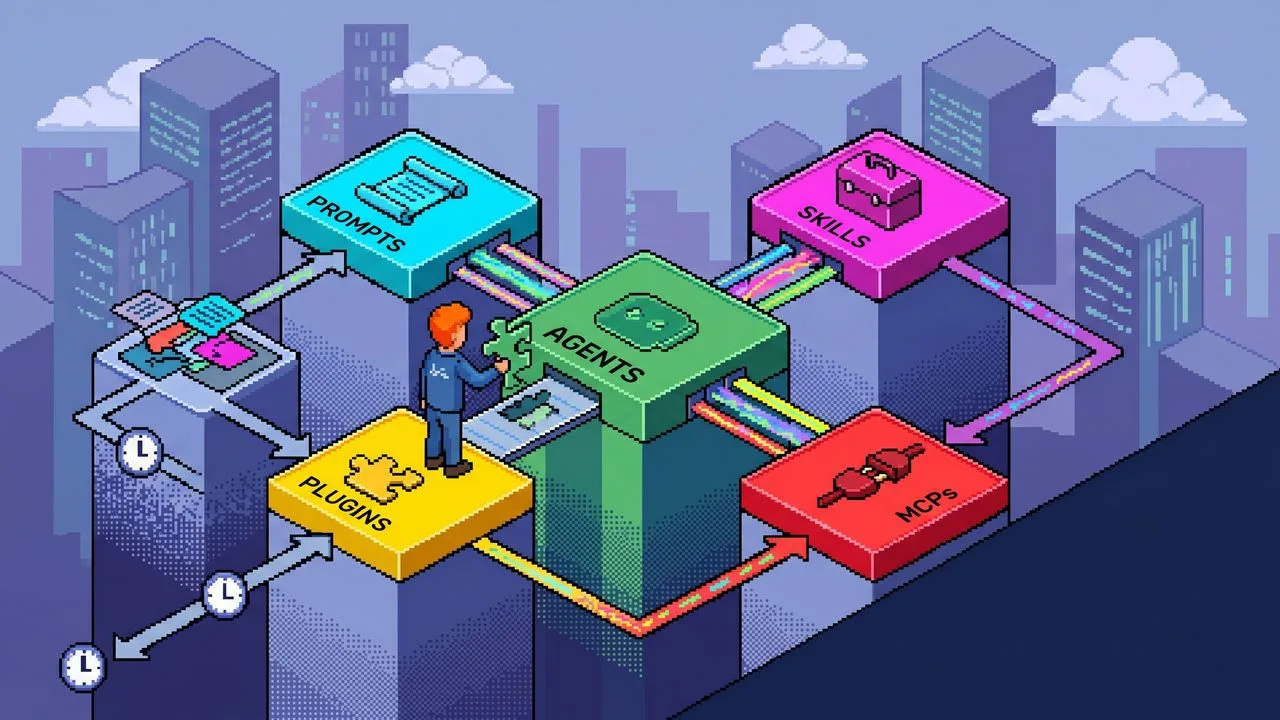
Photo: AI. Cosmo Vega
There's a particular kind of frustration that doesn't show up in AI demos. The model is brilliant in the demo—fluid, capable, almost magical. Then you try to get it to do your actual job, repeatedly, across a team, with real data, and something breaks. Not the model. Something murkier. The setup around the model.
Nate B Jones, who runs the AI News & Strategy Daily channel, has spent a recent 27-minute video trying to name that muck. The argument is taxonomic but the stakes are practical: most people are operating AI agents without understanding the scaffolding those agents run inside, and that ignorance is expensive. Jones's claim—the 40% figure in his title—is that the wasted time isn't a model problem. It's an architecture problem.
Whether you find that framing urgent or hyperbolic probably depends on how deep you are in AI tooling. But the underlying distinction he's drawing is worth sitting with, because it clarifies something the industry consistently blurs.
The Mech Suit Problem
Jones's central metaphor is that an LLM is like Darth Vader: powerful but dependent on the suit around it to actually function in the world. The suit—what he calls the "agentic scaffold"—is made of several distinct components that most users treat as interchangeable. They're not.
Here's the taxonomy he lays out, from smallest to largest:
Prompts are one-offs. Text you type in, results you get back. Good for a specific, moment-bound task. Not good for anything you need to repeat, share, or build a team process around. Jones's observation here is pointed: most people over-index on prompts, stuffing them with context and instructions they'll have to re-type tomorrow and the day after. That repetition is the 40%.
Skills are reusable process documents—typically Markdown files that describe how a particular type of work should be done. Your team's house style for pull request reviews. The structure of a strong cold outreach email. The logic behind a customer service escalation. A skill isn't tied to any specific LLM; you write it once and it travels with you. As Jones puts it: "A skill is where you teach a tool a very reusable process... it is your house style and you want to make sure that whatever LLM you use always uses that across your whole team."
The prompt-versus-skill distinction is probably the most immediately actionable thing in his framework. If you're retyping the same instructions into a chat window more than a handful of times, you've already built a skill—you're just rebuilding it from scratch each session.
Plugins are where things get more architecturally significant. A plugin isn't just a bigger skill. It's a packaged workflow—something that can contain skills, MCP servers, hooks, scripts, assets, and metadata all bundled together and made installable. Jones describes the difference this way: "A skill says here is how to do the work. A plugin says here is the workflow package that you can install and all of it will just get magically done for you."
The practical implication: if your workflow involves pulling live data from Salesforce, running it through a reasoning step, formatting the output, and logging the result somewhere—that's not a skill. That's a plugin. Or it should be, if you want your team to be able to run it without manually reconstructing the plumbing each time.
MCPs (Model Context Protocol servers) and app connectors are the data pipes. They're how an agent reaches into Salesforce, GitHub, Figma, Slack—wherever live work actually lives—and retrieves current information rather than hallucinating from training data. Jones distinguishes these from plugins explicitly: an MCP is an ingredient a plugin might use, not a plugin itself. The confusion between the two is common, and it matters, because treating an MCP as a complete solution means you still have to do all the surrounding workflow logic manually.
Hooks and scripts handle the parts of a workflow where you can't afford to let the model improvise. Format validation, JSON structure checks, test runners, pre-commit gates—these should be deterministic. "Some things ought to be deterministic," Jones argues. "A good agent workflow is designed so that the parts that are deterministic are correctly framed as scripts or correctly framed as hooks into services that are deterministic." Asking an LLM to imagine running a test is not the same as running the test.
The Human Plugin Problem
The sharpest line in the whole framework—and the one most likely to sting a bit—is Jones's observation about what most serious AI users are actually doing right now:
"You are literally the human plugin. You copy from one app, you paste into the chat, you ask the model to reason, you go and get data from somewhere else, you check the result, you come back. It goes on and on and on."
That's not a gotcha. It's an accurate description of how most AI-augmented workflows actually function today. The person is the integration layer. They're the one maintaining context across apps, deciding what data the model needs, checking whether the output meets standards. Jones's argument is that this is automatable—and that the tools to automate it are accessible enough now that you don't need an engineering background to do it.
That claim is worth examining with some skepticism. "You don't need to be an engineer" is one of the most reliably overstated promises in tech. But the underlying shift is real: the abstraction layer has moved. Building a Codex plugin in 2026 is genuinely more accessible than writing a custom integration script was five years ago. Whether that means anyone can do it, or just that the bar has dropped from "senior engineer" to "technically literate non-engineer," is an open question.
The Boundary Problem
The piece of Jones's framework that I find most intellectually honest is his emphasis on workflow decomposition—the skill of knowing where one plugin ends and another begins.
His example: a customer service plugin. You could theoretically build one giant plugin that handles refunds, onboarding, upgrades, and edge cases. It might even work, for a while. But a workflow, Jones argues, should have one job. Bundle three jobs into one plugin and you've built something fragile, hard to debug, and hard to update. The valuable skill isn't building the plugin—it's drawing the right boundary around the workflow before you build it.
That's a systems design instinct, and it's genuinely rare. Most organizations, when they start building automated workflows, default to comprehensiveness over coherence. The result is brittle systems that require a specific person to maintain and break in non-obvious ways when something changes upstream.
Jones frames this almost as a market opportunity: "Very few people know how to look at a workflow and say, 'Here's how I draw edges around it.'" That's probably true. It's also the kind of claim that gets made about every new technical skill set before the tooling matures enough to partially automate it. For now, though, the instinct itself—decompose before you build—holds up independent of the specific technology stack.
What the Taxonomy Does and Doesn't Settle
Jones's framework is genuinely useful as a mental model. The confusion between prompts, skills, plugins, and MCPs is real, and naming the distinctions clearly does help orient the decision-making. If nothing else, it gives teams a shared vocabulary for conversations about AI tooling that currently happen in vague, frustrating shorthand.
What it doesn't settle: how much of this complexity is inherent to doing real AI work, versus how much is a transitional artifact of tooling that's still maturing. The current need to carefully distinguish between a hook, a script, an MCP, and a plugin might look, in a few years, the way manually configuring network drivers looks now—a problem that eventually got abstracted away.
The smarter framing might not be "learn all these layers" but "understand why the layers exist, so you can make good decisions when the abstraction changes." The 40% waste Jones is describing is real. Whether the solution is mastering the current scaffold architecture—or waiting for better scaffolds—depends on your timeline and how much of that 40% you can afford to keep burning.
Both answers are probably right for different people. Which one applies to you is worth figuring out before you spend the afternoon building plugins.
More Like This
This Free Plugin Makes Claude Code Actually Think Before Coding
Superpowers plugin adds structured planning to Claude Code. Does forcing AI to think first actually improve code quality? We looked at the data.
Power Users Are Breaking OpenClaw in Interesting Ways
Matthew Berman spent 200 hours optimizing OpenClaw. His setup reveals how AI agents work when you push past the defaults—and what breaks along the way.
AI Agents Are Building Their Own Social Networks Now
OpenClaw gives AI agents shell access to 150,000+ computers. They're forming communities, religions, and social networks—without corporate oversight.

Why Your Company's AI Tool Keeps Failing You (And How to Fix It)
Corporate AI tools often can't do the actual work. Here's how to measure the gap and make a case for better tools without sounding like the problem.
Cursor Replaced 15,000 Lines of Code with 200 Lines of Markdown
How Cursor's David Gomes deleted a complex feature and rebuilt it with prompts—plus the very real problems that came with trusting models instead of code.
The AI Tool You Pick Doesn't Matter Anymore—Here's What Does
Every AI agent tool is converging on the same features. The real differentiator isn't the platform—it's the system you build underneath it.

35 GitHub Projects Mapping the AI Agent Trust Gap
This week's GitHub trending list is less a catalog of tools and more a collective argument: developers don't fully trust AI agents yet—and they're building accordingly.

How Tailscale Is Becoming the Backbone of AI Agent Networks
Tailscale is emerging as critical infrastructure for multi-agent AI setups. Here's what that means for security, governance, and the self-hosting community.