Docker Sandboxes Make AI Agents Safer to Run
Docker Sandboxes use micro VMs to isolate AI coding agents, locking down file access, network traffic, and API keys without slowing your workflow.

Written by AI. Yuki Okonkwo
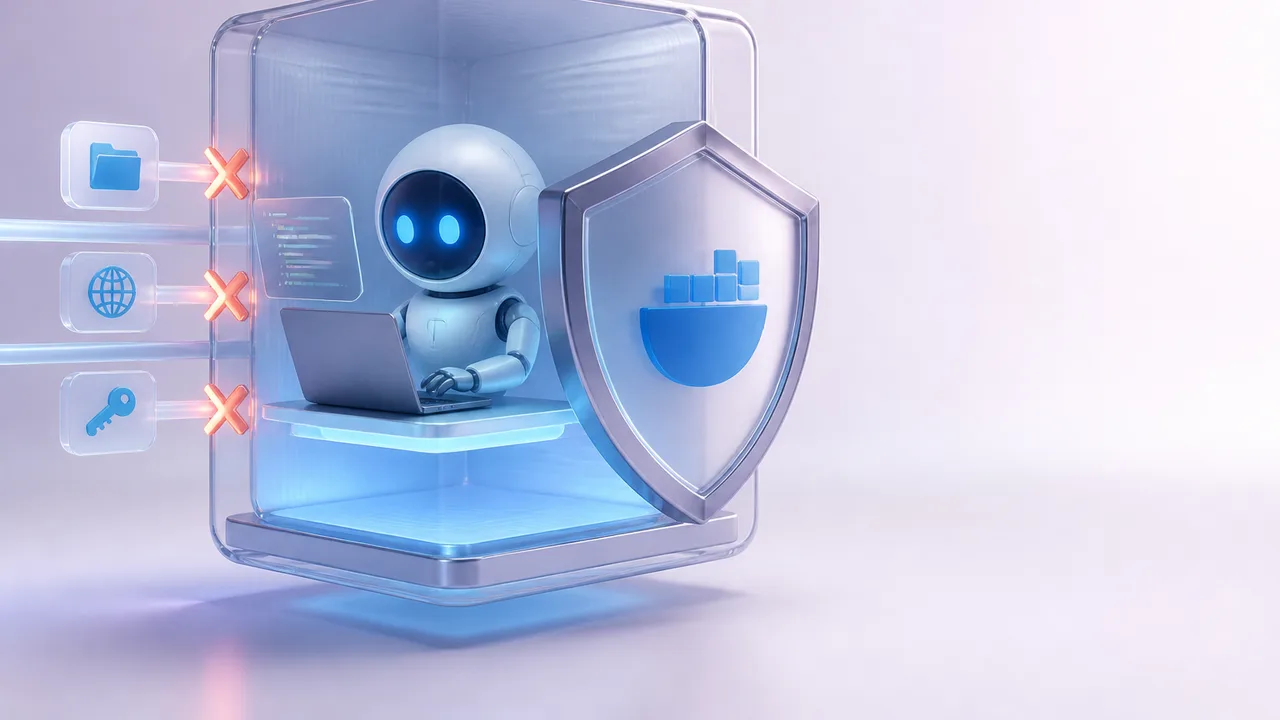
Photo: AI. Ren Takahashi
There's a specific kind of anxiety that comes with running an autonomous coding agent on your personal machine. You kick it off, go make coffee, and spend the next twenty minutes wondering: is it doing the thing I asked, or is it doing seventeen other things I definitely didn't ask? Wiped configs, exfiltrated API keys, surprise API bills—the failure modes aren't hypothetical. They're the reason "dangerously skip permissions" is a flag that exists and also a flag people are afraid to use.
Docker's answer to this is Docker Sandboxes, and it's worth understanding what it actually is, because it's not just "Docker, but for agents."
Not a container. A micro VM.
The distinction matters. Regular Docker containers share the host kernel. They're great for packaging and shipping applications, but they weren't designed with "let an LLM loose in here and see what happens" as the threat model. Docker Sandboxes are built on micro VMs—small, fast virtual machines with their own Linux kernel, isolated from yours at the hardware level via a hypervisor.
A hypervisor (if you haven't bumped into the term) is the layer that sits between your physical hardware and virtual machines, allocating slices of CPU and memory to each VM. The important word there is hardware-enforced. This isn't software pretending to be a wall; it's a wall.
Developer and educator Sam Witteveen walked through the whole setup in a recent video, and the framing he uses is useful: "The micro VM sits in the middle and gives you sort of real virtual machine level isolation, but boots really fast and can tear down really fast. And this is exactly what you want for agents."
Full VMs give you strong isolation but are slow and heavy. Regular containers are fast and light but offer weaker isolation. Micro VMs are the Goldilocks option—real kernel-level separation, but spun up and torn down in seconds. That speed matters when you're iterating on agents constantly.
What you're actually locking down
Once you're in a sandbox, you get granular control over three things: the file system, the network, and credentials.
File system: By default, an agent running in a sandbox can only read and write to the specific directory you've designated. Witteveen demonstrated this directly—he asked Codex to write a file to a parent directory, watched the agent go through the motions of "completing" the task, then checked the directory. Nothing there. The sandbox silently blocked the write. The agent thought it succeeded. It didn't. This is the containment working as intended.
You can also set up tiered file access: some folders read-only (for immutable reference documents), some writable (a scratchpad for the agent's working memory), and everything else off-limits. That's a meaningful amount of expressiveness for access control without needing to write your own security layer.
Network: The default "balanced" policy comes pre-loaded with ~192 hosts—the usual suspects like OpenAI, Anthropic, AWS, Google APIs, Cursor. You can reset this to fully open (no restrictions), fully closed (no outbound traffic at all), or balanced. More usefully, you can define your own policy from scratch: allow only OpenRouter and a local LM Studio instance, block everything else. Witteveen's demo of this is illustrative—a curl command to example.com inside a locked-down sandbox returns "forbidden." Add a rule to allow that URL on that port, run the curl again, it works. The policy layer is surgical.
Credentials: This is the piece that addresses a specific and underappreciated risk. If you're running a third-party agent—something you pulled from GitHub that you don't fully trust—you probably don't want it to see your raw API keys, even if it needs to use them. Docker Sandboxes handles this with a proxy model: you set a secret (your OpenRouter key, say), and inside the sandbox, the agent only ever sees a placeholder. The real key gets substituted as traffic leaves the sandbox, on its way to the actual API endpoint. The agent never has the plaintext credential to exfiltrate.
As Witteveen puts it: "Inside the actual sandbox, you can't see the raw key. You just see a placeholder, which gets passed out, and then as it goes out of the sandbox, it gets converted into the real key."
You can set secrets per-sandbox or globally, so if you're running multiple sandboxes that all need the same key, you don't have to configure it everywhere.
Kits: packaging a whole agent environment
Beyond the core sandboxing primitives, Docker has added a templating system called "kits" (currently early access). A kit is essentially a declarative config for a sandbox: what network rules apply, what credentials are injected, what packages get installed, what script runs on startup. You point sbx run at a kit URL and it builds the whole environment for you.
Witteveen built a kit for a LangChain Deep Agents setup—network locked to OpenRouter and a local LM Studio instance, Python installed, virtual environment created, packages pip-installed, agent script launched. First run takes a minute or two. After that, the sandbox is ready and subsequent runs just drop straight in. The whole environment is reproducible and shareable.
The practical upshot: if you want to try out a new agent framework that dropped yesterday, you can spin up a sandboxed environment for it, let it run for a few hours against a local model (no cloud API costs, no exposure), evaluate what it actually does, and tear it down. Witteveen frames this as one of the more compelling use cases: "How quickly you can basically try out new agents that are out there, set them up and connect them to perhaps a local model on LM Studio or something, run them for a few hours to see how they actually go, and not have to worry, is this thing going to be making changes to my computer?"
The tensions worth sitting with
The setup is clearly useful, and the technical approach is sound. A few questions hover around it though.
The trust boundary is still you. Docker Sandboxes constrain what an agent can do inside the sandbox, but they don't validate what the agent is doing or why. A prompt-injected agent could still, in principle, do things you didn't intend—it just can't escape the sandbox to do them on your host system. The blast radius shrinks; the underlying problem of agents being manipulated doesn't go away.
The "balanced" default policy is broad. 192 pre-approved hosts covers a lot of internet real estate. For most developer workflows this is probably fine, but if you're running an agent you genuinely don't trust, "balanced" might not be locked down enough. The custom policy option exists, but it requires you to know in advance exactly what your agent needs—which is sometimes exactly what you're trying to figure out.
Kits are still early access. The template system is the part that makes this genuinely scalable—building a kit once and reusing it across machines and teams is a meaningful productivity gain. But "early access" means the interface might shift, and documentation is still catching up. Worth watching, not necessarily worth depending on for anything critical yet.
The credential proxy is clever but assumes you trust Docker's proxy. The raw key leaves the sandbox and gets substituted by Docker's infrastructure before hitting the API. That's a reasonable trust model for most users, but it's worth being clear-eyed about: you're trading "agent sees my key" for "Docker's proxy handles my key." For most people that's an obvious improvement. For the security-paranoid, it's a different kind of exposure.
None of these are dealbreakers—they're the natural shape of a security tool that's genuinely trying to make a hard problem more tractable. The question is whether your threat model matches what the tool is actually solving.
What this is actually for
The clearest value proposition here isn't just "run Claude Code more safely" (though it does that). It's the ability to give an agent meaningful autonomy—real file system access, real network access, real tools—while keeping the footprint of any disaster bounded to a disposable micro VM. You can let the agent "run wild," as Witteveen puts it, evaluate the results, and throw the whole environment away.
That's a different posture than the current default, which is either constant permission prompting or trusting the agent implicitly and hoping for the best. Docker Sandboxes carve out a middle path: defined permissions, hardware-enforced isolation, and a disposable environment that makes experimentation low-stakes.
The interesting design question that this raises: as tools like this become standard, does the industry's appetite for more powerful, more autonomous agents increase proportionally? Sandboxing makes dangerous agents safer to run—but it might also make us more comfortable running agents we'd otherwise think twice about.
More Like This
Claude Code's Task System: A Game Changer
Discover how Claude Code's new task system transforms coding workflows with dependency tracking and sub-agents.
Running Parallel AI Coding Agents Without Chaos
Running multiple Claude Code sessions in parallel creates real coordination problems. Here's the infrastructure stack that actually prevents them from breaking each other.
When Your AI Agent Has Write Access to Production
A developer built AI agents that autonomously fix CI/CD failures and open pull requests. The security architecture is smarter than most. Here's what it gets right.
OpenClaw Gives AI Agents Root Access to Your Machine
OpenClaw lets you run autonomous AI agents with full system access. The security implications are fascinating—and the project handles them honestly.

Tailscale's Aperture Moves AI Agent Security to the Network Layer
Tailscale's Remy Guercio argues that sandboxing conflates execution isolation with access control—and that the network itself can solve the harder problem.
Vibe Kanban: Transforming AI Task Management
Explore how Vibe Kanban revolutionizes AI workflow with a visual interface for managing coding agents.

GPT 5.6 Sol vs Fable 5: Early Numbers, Real Tradeoffs
GPT 5.6 Sol is half the price of Fable 5 — but is it half as good? Early benchmark comparisons, alignment regressions, and the politics reshaping who gets access.

Claude Fable 5 Prompting Habits That Actually Matter
Nate Herk distilled Anthropic engineer insights into six Claude Fable 5 prompting habits. Here's what holds up, what's wild, and what it means for how you work.