Decimen Transfers Files With QR Codes, No Network Needed
Decimen transfers files between devices by flashing QR codes on screen — no WiFi, no Bluetooth. Here's how it works and where it actually struggles.

Written by AI. Tyler Nakamura
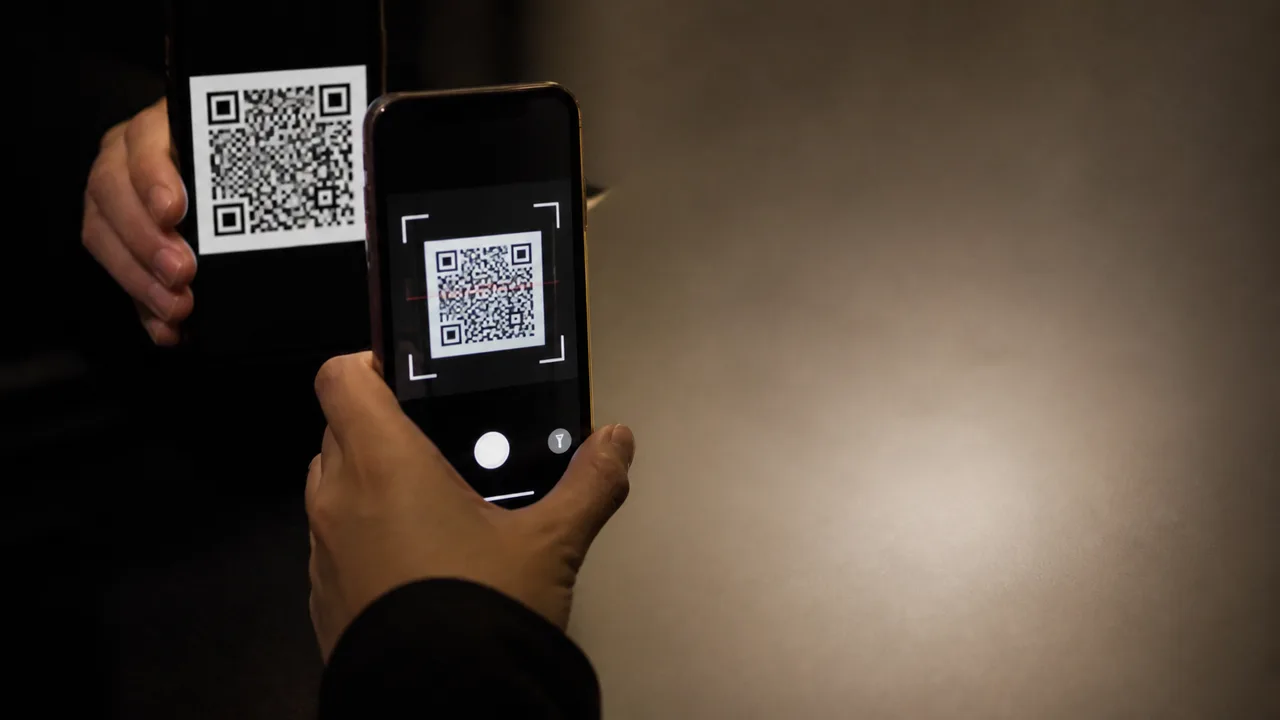
Photo: AI. Renzo Vargas
Let's say you need to move a file from one device to another and every normal option is off the table. No WiFi. No Bluetooth. No USB. No cable, no cloud, no AirDrop, no NFC. What's left?
Apparently: point a camera at a screen.
That's the actual premise of Decimen, an open-source tool built by developer Evan Cwley. One device flashes a rapid sequence of QR codes on its screen. Another device points its camera at those codes and reconstructs the original file from whatever frames it managed to catch. No network stack involved at any point. Just light, glass, and some surprisingly clever math.
Better Stack's Andress just posted a nearly ten-minute breakdown of how Decimen works under the hood — testing it in two real scenarios, digging into the source code, and figuring out exactly why the results in those two scenarios were so wildly different. It's worth your time if you care about this kind of thing.
The part that's smarter than the elevator pitch
The obvious weakness in "flash QR codes at a camera" is synchronization. Screens don't refresh instantaneously. Cameras don't capture instantaneously. If they get out of sync, frames get blurred together or dropped entirely, and suddenly you're missing chunks of the file with no way to request them again.
Decimen's answer is fountain coding. Instead of sending frame 1, frame 2, frame 3 — a strict sequence where every packet has to land — it generates a continuous stream of frames where each frame is a mathematical blend of pieces from the original file. The receiver doesn't need any specific frame. It just needs enough frames, whichever ones happen to come through cleanly. As the presenter explains: "No single frame is irreplaceable. The receiver doesn't need frame number 47 specifically. It just needs enough frames, whichever ones happen to land."
Miss half the frames? Keep going. The sender just keeps broadcasting until the receiver signals it has collected enough blended pieces to mathematically reconstruct the whole thing. It's a legitimately elegant idea — borrowed from decades-old erasure coding theory and applied here to the problem of a camera that might blink.
The tradeoff is throughput. By default, Decimen sends 2,953 bytes per frame — that's QR code version 40, the largest standard size, a 177×177 grid of tiny modules per frame. Decimen's readme claims a peak of around 128 KB/s, measured phone-to-phone. (Rough math on the raw frame parameters puts the theoretical ceiling somewhat higher before fountain coding overhead, but 128 KB/s is the number the project actually stands behind.)
The reason that 128 KB/s figure comes with the "phone-to-phone" qualifier turns out to be the whole story.
The laptop-to-phone failure, which is exactly the setup most people would try first
When Andress ran the obvious test — laptop as sender, phone as receiver, normal arms-length distance, like you'd actually use this in practice — the transfer speed cratered. The presenter reported a decode rate of roughly 1–2% of transmitted frames. The rest were captured and thrown away.
Watching that number appear in the video, my first thought was: yeah, that's the setup I'd have tried too. It's the most natural interpretation of "transfer a file from my computer to my phone." And it turns out to be exactly wrong for three compounding reasons.
First: frame rate mismatch. Decimen's sender pushes 60 frames per second. A phone camera captures at 30. You'd think that means you catch every other frame cleanly — but it's messier than that. Each camera exposure window straddles two QR codes on screen at once, blending them together into something that decodes to nothing. It's not a miss; it's a corruption. Andress found a note in the project's main.ts file acknowledging that iOS will silently deliver 30fps even when the app explicitly requests 60. "The camera just doesn't give you what you requested," the presenter notes, "and the code already addresses that."
There was also a comment in the same file that essentially predicted this outcome in advance. The defaults — 2,953 bytes per frame at 60fps — are tuned specifically for close-range phone-to-phone demos. "The project told me this would happen," Andress says. "I just hadn't scrolled far enough in the code to see it." That's a line that lands. The failure mode was documented. The tool knew it was going to struggle. The user just didn't know to read that part first.
Second: code density vs. camera resolution. QR version 40 needs roughly 3–4 camera pixels per module to decode reliably. That works out to 600+ pixels across the code itself, in sharp focus. A laptop screen at arms length doesn't fill enough of a phone's camera frame to hit that threshold. A phone screen held close does, easily.
Third: LCD ghosting. A 60Hz laptop panel's pixels take time to fully transition between colors. At 60fps, the next frame starts painting before the previous one has fully resolved. The phone-to-phone scenario avoids this entirely — OLED screens switch near-instantaneously.
None of this is a bug in Decimen, exactly. It's the physics of the approach showing through.
What actually fixes it
The fix Andress demonstrates is a manual rebalance of the three variables the system depends on. Drop bytes per frame to 1,465 — a coarser QR version with bigger, more forgiving modules. Drop transmit FPS to 24, deliberately below the phone camera's 30fps ceiling, so frames get sampled cleanly one at a time instead of blending. The result is a meaningfully higher decode rate on the laptop-to-phone path.
Decimen's receiver helps diagnose the problem: it reports capture FPS and decode FPS separately. When those numbers diverge — camera catching frames fine, but decoded count staying low — you're looking at a density or sync problem, not a hardware failure. That's a useful diagnostic tool for a system with this many variables.
The phone-to-phone scenario, meanwhile, is where Decimen performs as advertised. OLED screen, close range, filling the viewfinder, matching frame rates. The claimed 128 KB/s is achievable there.
Where you'd actually use this
The use cases are narrower than a general file transfer tool, but they're real. Airgapped devices — systems deliberately kept off any network for security reasons — can't use WiFi or Bluetooth by design, and sometimes you can't physically plug anything in either. Old hardware or embedded systems without any wireless stack at all. Situations where a screen and a camera are genuinely the only two interfaces you can count on.
"Anywhere where a screen and a camera are the only two things you can count on," as Andress puts it.
For those scenarios, Decimen is not competing with AirDrop or a USB drive. It's competing with nothing, because nothing else works.
My read on where this goes
The honest version of this project is: it works, it works well in the scenario it was optimized for, and it requires manual calibration for anything else. Whether that's a dealbreaker depends entirely on your use case.
But here's what I keep coming back to: the tuning requirement isn't going away. Even as phone cameras improve and OLED gets cheaper, the fundamental three-way constraint — frame rate, code density, receiver resolution — doesn't dissolve. Better hardware raises the ceiling, but the ceiling still exists, and you still have to find it manually for each new device combination. The project's readme already acknowledges this; the defaults are tuned for one specific scenario, and the rest is on you.
My bet is Decimen stays niche — not because the engineering is weak, but because the use cases where "no network, no USB" is a hard constraint are genuinely uncommon for most people. The users who do hit those constraints — security-conscious sysadmins, embedded systems folks, anyone working with legacy hardware that hasn't seen a wireless chip — will find it and tune it and get it working. Everyone else will reach for their USB cable and not think about it twice.
That's not a criticism. A tool that does one specific thing well, for the people who actually need it, is not a failure. It's just a tool with a clear job description.
More Like This

Chrome's HTML-in-Canvas Experiment Might Make the Web Fun Again
Chrome Canary's new HTML-in-Canvas feature lets developers embed interactive DOM elements in WebGL scenes. It's experimental, buggy, and kind of brilliant.

Penpot Wants to Fix Design Handoff—Does It Actually?
Better Stack demos Penpot, an open-source design tool that speaks CSS natively. We look at what it solves, what it doesn't, and who should care.
TSRX Wants to Replace JSX — But at What Cost?
TSRX is a new syntax layer that lets you write React components with plain if statements and no return. Here's what junior devs actually need to know.
Inside the Smartphone: 120 Years of Hidden Engineering
Professor Hannah Fry tears apart a modern smartphone to trace 120 years of engineering history — from Marconi's radio waves to a 200-million-pixel camera sensor.

TanStack Got Hacked—And Nobody Made a Mistake
A sophisticated NPM worm hit TanStack and 160+ packages—with a deadman switch that wipes your PC if you revoke stolen credentials. Here's what actually happened.

Croc Is an Open-Source CLI File Transfer Tool Worth Knowing
Croc is a free, open-source CLI tool that uses full-duplex relays and PAKE encryption to make file transfers fast, secure, and genuinely simple.

Marina Wyss Went From $60K to $600K in 8 Years
Marina Wyss details the pay cuts, pivots, and 100+ job rejections that took her from $60K to $600K in AI—and what her creator business actually reveals.

AI Is Reshaping Services Jobs—Are You Ready?
Y Combinator thinks AI-native startups will rewrite tax, law, insurance, and healthcare. Here's what that means if you're early in your career in those fields.