Claude Design's Hidden Cost: Why Your Usage Quota Vanishes
Claude Design makes iterating on UI blazingly fast—but you'll burn through 25% of your weekly quota before you finish a landing page. Here's what actually matters.

Written by AI. Yuki Okonkwo
Here's the thing nobody tells you about Claude Design /article/anthropic-claude-design-automate-creativity: it'll let you create a gorgeous landing page in minutes, then eat 17% of your weekly usage quota for breakfast. And if you're thinking about setting up a design system first? That's another 25% gone before you've generated a single pixel.
Chase AI's new masterclass walks through Anthropic's answer to Google's Stitch—a visual design tool that promises to revolutionize front-end work. And in some ways, it delivers. But the usage economics create a really specific calculus about when this tool is actually worth using.
The Power Is Real (So Is The Bill)
Claude Design lives at claude.ai/design (web only, no desktop app access), and its core promise is simple: visual iteration at a speed that makes traditional Claude Code feel like writing HTML in Notepad. The video demonstrates this with a basic landing page for a fictional social media intelligence platform called Argus.
The initial generation from a minimal prompt takes 4% of weekly usage. Not terrible. But here's where it gets interesting—and expensive. The creator then asks Claude to "increase the amount of tweaks aggressively," adding controls for color palettes, corner radius, fonts, layouts, ticker speed, even the market niche displayed in mock data. That costs another 7%.
Then comes the variants—completely different design directions like "Bloomberg terminal style" or "hypermaximal editorial." Two more variants: another 5%. We're at 17% usage for a single landing page hero section with multiple visual options.
"The power isn't like, oh, it can oneshot the UI design, and the UI design off the rip is so good," the creator explains. "No, it's the fact that I can actually iterate very quickly."
That's the tension Claude Design creates: unprecedented iteration speed, but at a cost that makes you think twice about every generation.
Where Claude Design Actually Wins
The video's head-to-head comparison between Claude Design and Claude Code using identical prompts reveals something surprising: the first-pass outputs aren't dramatically different. Claude Code, using a front-end design skill, produces something comparable to Claude Design's initial attempt. Some text overlap issues on both sides, decent layouts on both sides.
So why use Claude Design at all?
Two features emerge as genuinely transformative: the tweak system and variant generation.
Tweaks operate at the micro level—fonts, colors, spacing, emphasis. You're not re-prompting and regenerating; you're clicking through visual options in real-time. Want to see how this landing page feels with a dark background versus light? Different corner radius on the cards? Different headline styles? It's instant.
Variants operate at the macro level. Claude Design can generate completely different design directions—brutalist, synthwave, editorial, whatever—that you can click between and compare side-by-side. No more trying to hold multiple design directions in your head while prompting Claude Code through iterations.
The workflow that emerges: generate variants first to nail down your macro direction, then aggressively tweak to get to 80-90% of your vision, then export to Claude Code for final implementation and functionality. Hours of back-and-forth collapsed into minutes of visual selection.
The Design System Trap
Design systems sound incredible in theory—upload your brand assets, fonts, color schemes, and existing code once, then have Claude Design apply that visual language to every future project automatically. No more repeating yourself about brand guidelines for each new page.
The video walks through creating one based on an "agentic OS dashboard" with specific Claude-themed colors and typography. Claude Design ingests everything, generates a comprehensive design system breaking down every component, every color choice, every font decision. It's impressively thorough.
But here's the caveat the creator repeats multiple times: "Resource hog, resource hog, resource hog. Don't get screwed by this."
Creating a design system takes 5-15 minutes of processing time and immediately consumes 20-25% of your weekly usage quota. For anyone on Pro, Max 5, or 20x plans (the limits are identical across tiers), that's a significant investment before you've built anything.
The math only makes sense if you're consistently building projects within the same visual language. One-off projects? Skip the design system. Ship the 25% tokens directly to design generation instead.
What The Usage Limits Actually Mean
Here's what feels underexplored: why is this so expensive computationally? The video mentions Claude Design as a "resource hog" repeatedly but doesn't dig into what's actually happening under the hood that makes visual iteration cost so much more than text generation.
My suspicion (and this is speculation, not from the video) is that we're seeing the cost of running vision models continuously—analyzing visual output, comparing it to prompts, generating new variations, all while maintaining enough context to make the tweaks system feel responsive. That's a lot of model calls that aren't visible to the user.
The practical effect: Claude Design becomes a tool you use strategically, not casually. You're not going to open it up to brainstorm random ideas or explore speculative directions. You're coming with a specific project, a clear intent, and you're getting in and out efficiently.
Which might actually be healthy? There's something to be said for tools that make you think before you generate, that reward intentionality over spray-and-pray prompting. But it's definitely a different paradigm than "just ask Claude to try stuff until something clicks."
The Context Problem Nobody Wants To Hear
The most practical advice in the video might also be the least exciting: "Starting from a blank slate and expecting claw design to do all the heavy lifting cuz I bet your prompt will suck."
Harsh but probably accurate. The creator recommends feeding Claude Design something—screenshots from Dribbble, Awwwards, existing codebases, Figma files, even crude sketches drawn directly in the interface. Anything to avoid the dreaded "regression to the mean" that happens when you give AI tools zero context.
There's also a "plan mode" workflow mentioned briefly: instead of immediately generating, ask Claude Design to interview you with questions about your project first. What's the vibe? Who's the audience? What actions matter most? This upfront investment (presumably in tokens and time) reduces the iteration cycles needed later.
But here's the unspoken question: if you need to do this much prep work anyway—gathering inspiration, clarifying your vision, maybe even sketching layouts—how much are you actually saving versus just... designing it?
The answer seems to be: a lot, but only if you're already pretty clear on what you want. Claude Design accelerates execution and explores variations. It doesn't replace creative direction.
Export options are genuinely solid though—HTML, PowerPoint, PDF, Canva, or straight to Claude Code with a single click. And crucially, you can see the actual code at any time. It's not a black box pumping out mysterious artifacts. You're always one click away from the HTML, ready to pull it into your local environment.
Which raises the final question the video doesn't quite answer: as these tools get better and the usage limits (presumably) relax over time, where does the human design sense actually sit? Are we heading toward a world where "designer" means "person who knows how to iterate AI outputs efficiently" rather than "person who can create from scratch"?
The video doesn't moralize about this, which I appreciate. It just shows you the tool, what it costs, what it's good at. How you feel about that trade-off is on you.
More Like This
Claude Design Burns Through Credits Fast. Here's What Works.
Anthropic's new design tool creates prototypes in seconds—but you'll hit usage limits faster than expected. What the early adopters learned the hard way.
I Tested Claude Design: Here's What Happened to My UI
Developer OrcDev spent hours testing Anthropic's Claude Design AI tool. The results reveal what AI can—and critically can't—do for interface design.
Anthropic's Claude Design: The Latest Bid to Automate Creativity
Anthropic launches Claude Design, an AI tool that generates visual assets from text prompts. But can conversation replace craft in design work?
Anthropic's Claude Design Tool: What Actually Changed
Anthropic released Claude Design for UI prototyping. We tested it to see if it escapes the 'vibe-coded' look that plagues AI-generated interfaces.
Pencil.dev Brings Free Design-to-Code Canvas to Claude
Pencil.dev's new desktop app connects design and code through Claude's MCP integration, offering a free alternative to Figma for AI-assisted frontend development.
Ralph Loops vs. GSD: A Coding Framework Showdown
Explore the pros and cons of Ralph Loops and GSD in coding workflows, focusing on project management and execution.

Connecting MCP Servers to Claude: What It Means
MCP servers let Claude reach beyond the chat window into files, databases, and live systems. Here's what that connectivity actually looks like—and why it matters.
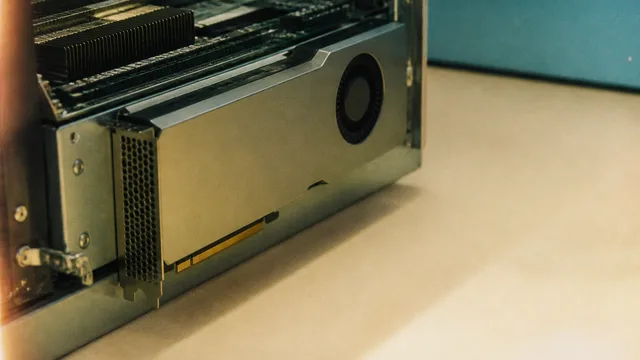
AMD Instinct MI350P: 144GB HBM3E in a PCIe GPU
AMD's Instinct MI350P brings 144GB of HBM3E and 3.6TB/s bandwidth to standard PCIe servers. Here's what it means for the mid-market AI infrastructure gap.